Creating Your Claude Account
Get set up in under ten minutes — and know whether the free plan or Pro is right for you.
In this lesson, you'll learn to…
- 1Create your Claude account and find your way around the interface
- 2Decide between the free plan and Pro based on how YOU will actually use it
- 3Set up the mobile app so Claude is with you everywhere
Free vs Pro, in plain English
The free plan is real — not a teaser. It includes full conversations, web search, memory, file creation, and even up to 5 Projects. For much of this academy's first modules, it's plenty.
Our honest advice: start free. Finish Module 1. Upgrade when you feel the limit — then you'll know exactly why you're paying.
| Free | Pro | |
|---|---|---|
| Price (July 2026) | $0 | $17/mo billed annually · $20 monthly |
| Full conversations with Claude | Yes | Yes |
| Memory across conversations | Yes | Yes |
| Usage limits | Lower daily limits | At least 5x more — resets every 5 hours |
| Model choices | Core models | More models, including the most capable |
| Projects (Lesson 5) | Up to 5 projects | Unlimited + enhanced project knowledge |
| Also includes | Web search, files, connectors | Claude Code, Cowork, Research, Microsoft 365 |
| Best for | Learning Modules 1–2 | Daily business & content workflows |
Watch out: Verified against claude.com/pricing in July 2026. Plans, prices, and features change — always check the official pricing page before deciding.
A two-minute tour
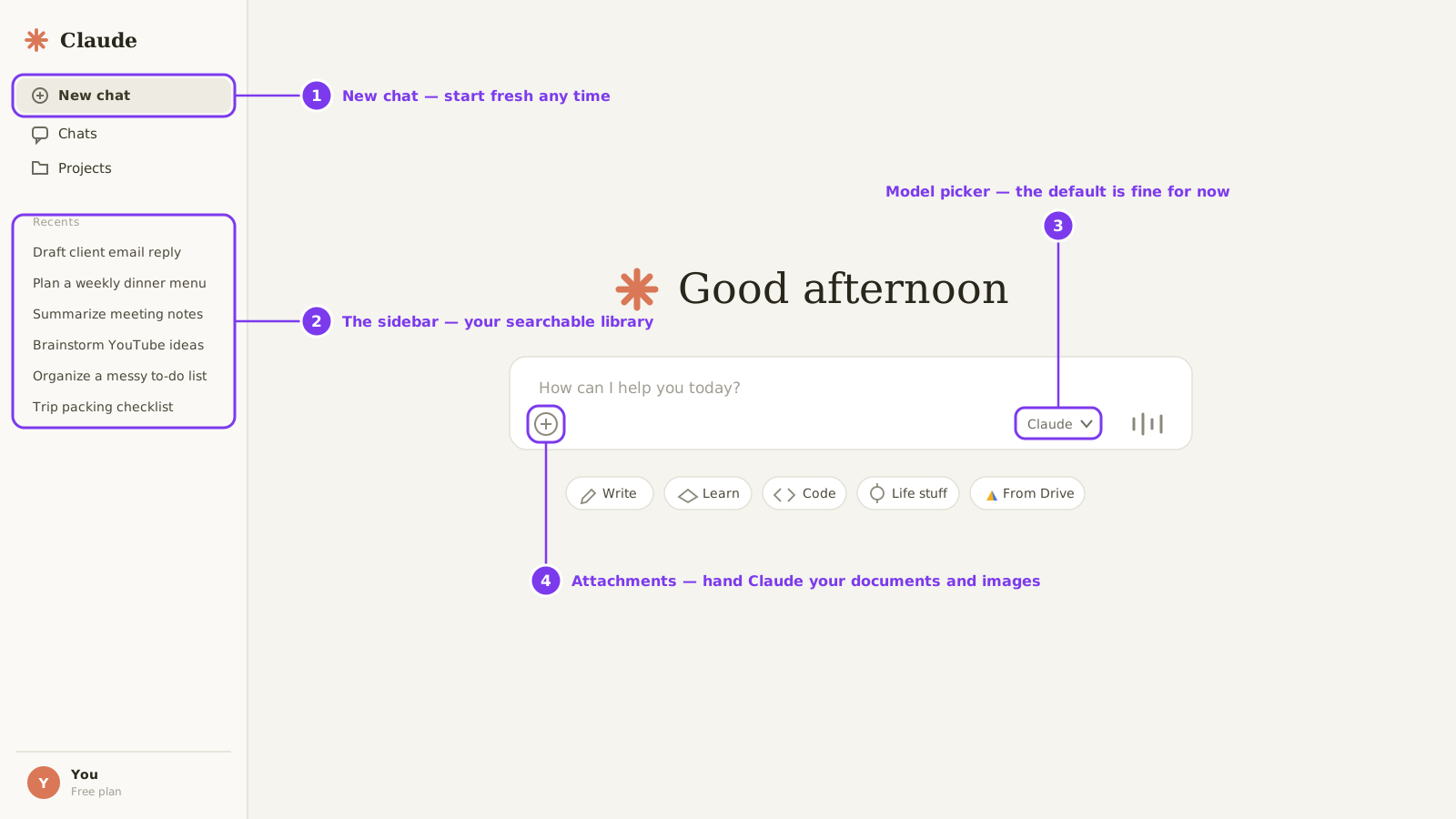
When you log in, you'll see a simple chat box. That simplicity is deceptive — four things matter:
1. New chat
Start fresh any time — Claude's memory still carries key context from your past chats
2. The sidebar
Your past conversations — name them well and it becomes a searchable library
3. Model picker
Faster vs. more capable — the default is fine for now
4. Attachments
Hand Claude documents, spreadsheets, and images — essential from Module 2 on
Pro tip: Name your conversations as you go. Future-you will thank present-you every single week.
Prompt Lab
Every prompt below is exactly what you saw in the lesson. Copy them, use them, make them yours.
Test-drive prompt for your new account
Send this right after you log in for the first time — it doubles as a setup check.
I just created my account. To make sure everything works, do these three things:
1. Tell me one surprising thing you can help with that most new users never discover
2. Write a 2-sentence professional bio for me based on: [your job/business in one line]
3. Suggest a name for this conversation so I can find it later
Why it works: Three instructions in one message — you're already practicing multi-part prompts, and Claude's answer teaches you a feature, shows off quality, and starts your naming habit.
AI Workflow View
How AI fits into the real-world process — step by step.
Sign up
claude.ai — free plan
Test prompt
Your first multi-part message
Claude
Answers + names your chat
Mobile app
Claude in your pocket
Ready
Set up everywhere you work
Ten minutes of setup — then Claude is wherever your work is.
Hands-on Lab: Full Setup
0/5 steps done
Ten minutes now saves friction every day after.
Your Turn: Do It Yourself
Now it's your turn. Follow these steps and check them off as you go.
You'll know it worked when:
You're logged in on desktop and mobile, you've sent your first multi-part prompt, and your first conversation has a name you'll recognize next week.
Going further:
Explore Settings and set your display name — small, but Claude sees it and conversations feel more natural.
Download Resources
Knowledge Check
3 questions — click the best answer for each scenario, then check your answers.
Question 1. When should you upgrade from free to Pro?
Question 2. You had a great conversation with Claude last Tuesday but can't find it. What habit prevents this?
Question 3. You told Claude all about your business yesterday. Can a brand-new chat today use any of that?
0/3 answered
Key Takeaways
- Start free, upgrade when you feel the limit — you'll know exactly what you're paying for
- Name your conversations — your sidebar becomes a searchable library of everything you've built
- Claude's memory carries context across chats on every plan — Projects (Lesson 5) add organized workspaces on top
Lesson Summary
You created your account, learned the interface's four essentials — new chats, the sidebar, the model picker, and attachments — and set up mobile so Claude travels with you. You know the free plan is genuinely capable (including memory and up to 5 Projects), and exactly what would justify Pro: more usage, more models, and unlimited Projects. Next lesson: the conversation skills that separate one-line askers from people who get incredible results.
Module 1: Getting Started with Claude
0/5 doneYou'll know it worked when:
You're logged in on desktop and mobile, you've sent your first multi-part prompt, and your first conversation has a name you'll recognize next week.
Going further:
Explore Settings and set your display name — small, but Claude sees it and conversations feel more natural.

